

• Skip to primary navigation
  • Skip to main content
  • Skip to primary sidebar
  • Skip to footer
  • Start Here
  • Work with David
  • Our Services
  • Contact
Young Adult Money

Make more. Save more. Live better.

  • Blog
  • Credit Cards
    • Rewards
    • Cash Back
    • Travel
    • Airlines
    • Hotels
    • Balance Transfer
    • Student
    • Business
  • FREE Budget Spreadsheet
  • FREE Student Loan Spreadsheet
This Just In... Check out the latest travel rewards credit card offers

How to find free pictures and images you can use on your blog or website

By David Carlson / Last updated: March 24, 2013 / Blogging

We may receive compensation from companies mentioned within this post via affiliate links. Read our full advertiser disclosure. Opinions, reviews, analyses & recommendations are the author’s alone, and have not been reviewed, endorsed or approved by any of these entities.
Pin1
Share
Tweet
Email
Buffer2
Share
3 Shares

When it comes to blogging, having an image versus not having an image to go with your blog post can make a huge difference from a reader’s standpoint.

People don’t read entire blog posts, but more often than not skim the posts for key points and information. I’m sure you’ve heard the saying “a picture is worth a thousand words.” Well, not only are they worth a thousand words but they also are quick and easy to process and therefore a very effective feature to include in your blog post.

Posts where I heavily utilize images are usually very well-received. For example, in my post 7 Home Upgrades I Want…Someday ;), I used an image for each of the seven home upgrades I listed. It took me longer to find the images than it did to write and edit the post, but it definitely was time well spent.

There really are only a few viable options, in my opinion, when it comes to photos and images on blog posts:

1) Use your own pictures

There have been many times that I’ve taken my own pictures for posts. For example, I took a photo for my post The Pros and Cons of Reusable Grocery Bags, and my wife has taken pictures for many posts including How To Clean Your Gutters Without A Ladder and Ways to Buy Safe Cleaning Products on a Budget.

Another source of free images that are unique to your blog are screenshots. Screenshots are ideal for a lot of “how to” posts. For example, in my post How I Got 50,000+ Twitter Followers it only made sense to have screenshots of my step-by-step process of gaining Twitter followers.

In an ideal world, every blog would have a unique and exclusive photo or image taken by the blog author or by a paid photographer. In reality, this is impractical and impossible for many bloggers who do not blog full-time and have to manage their time in an effective manner.

2) Use pictures from Flickr

A large majority of the time I use photos/images from Flickr that are licensed under the creative commons 2.0 that allows for commercial use of images. If you use this link you will be able to search all the images on Flickr that fall under the cc 2.0 license.
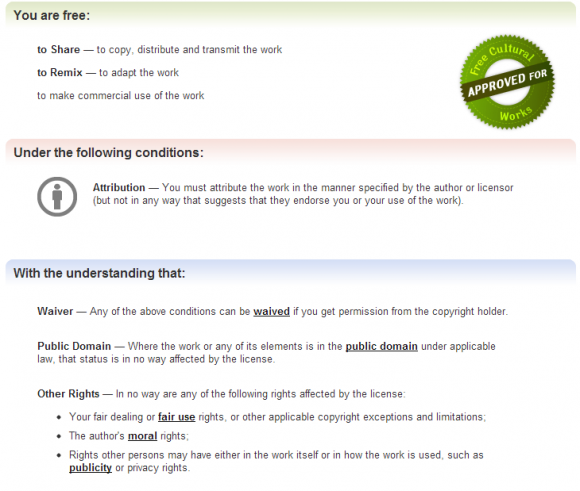
To be in compliance with the creative commons 2.0 license, you have to attribute the work in the manner specified by the author or licensor. This usually just consists of linking back to the image on Flickr, but sometimes people ask you to link to a specific page. What you may find surprising, though, is that many photographers do not ask you to link to a page other than the Flickr page. I think they are under-utilizing Flickr and should consider linking to a personal web page, twitter account, facebook page, or anything else that may generate paid work. Nevertheless, the key takeaway for bloggers and website owners is that there is a huge database of images that can be used for commercial works at no costs.

The nature of the beast with these “free” images is that it can take a long time to find images that are high quality or are exactly what you are looking for. There may be a specific image you have in mind, but you will have to settle for something that isn’t quite what you are looking for. You really do “get what you pay for.” Further, if you are a sports blogger, don’t expect to find images from x or y game that happened yesterday. It’s just not a viable source for sports bloggers.

____________

For new bloggers and website owners, figuring out where to find free images and photos they can use (legally) on their blogs or websites can be difficult. Hopefully between taking your own pictures and using those available on Flickr you can have a constant source of images to use on your site.
____________
Photo by ibm4381


Check out some of our favorite personal finance resources:

Are you getting the best credit card rewards? Check out the top cash back credit card offers (updated daily)

Make extra money: 15 ways to make money from your computer

  • Get our FREE Automated Budget Spreadsheet and our Student Loan Spreadsheet

Get the First Chapter Free!

Student Loan Solution Cover - 3D

Join our online community and get the first chapter of the book Student Loan Solution absolutely FREE!

Pin1
Share
Tweet
Email
Buffer2
Share
3 Shares

David Carlson

David Carlson is the founder of Young Adult Money. He is a nationally recognized speaker and the author of Student Loan Solution (2019) and Hustle Away Debt (2016). His opinions have been featured on such media outlets as The New York Times, The Washington Post, Cheddar, NBC's KARE11, and more.
Connect:

Comments Policy

Comments, responses, and other user-generated content is not provided or commissioned by this site or our advertisers. Responses have not been reviewed, approved, or otherwise endorsed by this website or its advertisers. It is not the responsibility of advertisers or this website to ensure that all comments and/or questions are answered. With all that being said, please comment away!

Reader Interactions

Comments

  1. FrugalRules says

    Good post DC! I use Flickr CC quite a bit as they have the best options available (for free) that I can find. I do use some of my own, but not that often. At some point I may just but the bullet and pay for the pictures so I don’t have to worry with the attribution.

    • DC @ Young Adult Money says

      @FrugalRules For sure, I have considered paying a friend to use their pics exclusively on this site.  For now I don’t see much point unless the revenue justified it.  There’s just so many free images out there.

  2. SenseofCents says

    I use Flickr. I’m really trying to use more of my own pictures though. It’s a big goal of mine to do so!

    • DC @ Young Adult Money says

      @SenseofCents Yeah it’s always nice to have unique images/photos on your site.  I think they stand out.

  3. wisedollar says

    I also use Kozzie and morguefile, thay are a good source of pictures that are free to use.

    • DC @ Young Adult Money says

      @wisedollar Thanks for sharing!

  4. MonsterPiggyBank says

    Flickr seems to be one that most people like to go for as there is such a large collection of images available.

    • DC @ Young Adult Money says

      @MonsterPiggyBank Best database I’ve found so far

  5. RFIndependence says

    I use freedigitalphotos a lot and also a plugin called photodropper that allows to browse creative commons and insert the credits automatically to a post.

    • DC @ Young Adult Money says

      @RFIndependence Nice, thanks for sharing those.  I will have to check them out.

  6. Holly at ClubThrifty says

    Greg always changes the pictures that I pick out!  I think he uses Flickr.

    • DC @ Young Adult Money says

      @Holly at ClubThrifty Haha that’s really funny.  So you can take no credit for any of the pics, then?

  7. AverageJoeMoney says

    I would love to use my own pics, but I’m an absolutely horrible photographer. In the future, I plan to take a photography class and create a bunch of pics. That said, I like using Instagram for pics on twitter. Right now I use Creative Commons (which funnels to Flickr and several other sources for legal, free pics).

    • DC @ Young Adult Money says

      @AverageJoeMoney For Twitter I don’t really pay a ton of attention to what service I use, since they all get the job done.  I would like to take more pics as well, but with a wife who is an aspiring photographer I have a lot less motivation ;)

  8. Eyesonthedollar says

    I also like freedigitalphotos.net. I wish I were a better photographer, but that would probably require a new camera, etc. Best just to find the free ones online.

    • DC @ Young Adult Money says

      @Eyesonthedollar I think it’s important to prioritize.  There are tons of free photos out there that allow commerical use.  Why spend time taking your own when you can do more productive things?  That’s my approach, at least.

  9. Beachbudget says

    I try to use my own pics whenever possible but will often use freedigitalphotos.net. I do agree that having photos enhances your blog.

    • DC @ Young Adult Money says

      @Beachbudget I honestly have never used that site, so I’ll have to check it out.

  10. moneymatters says

    I use a lot of my own photos, but also get them from a variety of the free stock photo websites like http://www.sxc.hu/.
     
    Only problem I’ve had with using Flickr photos was in the past I would hotlink the image from Flickr, and then the image would disappear and show a broken image on my site. So make sure to download the photos to use if you go that route. Also, be careful as I’ve had images go from creative commons to rights reserved later on and had to remove them.

    • DC @ Young Adult Money says

      @moneymatters Great points, Peter.  I would obviously prefer (and I think everyone else would agree!) using my own images, but not in the cards right now.  Great reminder about images changing from creative commons to rights reserved.

  11. DebtRoundUp says

    I use flickr along with freedigitalphotos.net to get photos.  They are both easy to search and easy to download.  I always make sure to attribute the photo back to the site or specific page depending on the standards.
     
    As some indicated, I always download the image, never hotlink to them.

    • DC @ Young Adult Money says

      @DebtRoundUp Agree with you about downloading the image, it’s the only way to go.

  12. ayoungpro says

    I use flickr 99% of the time. I haven’t really considered using my own pictures, but that is a good thought!

    • DC @ Young Adult Money says

      @ayoungpro I’d recommend using your own pictures if you can, but if you can’t there are plenty of free ones available online.

  13. Money Life and More says

    I use the photodropper plugin… Saves me sooooo much time :)

  14. Megan at Paying for Life says

    I don’t mind flicker – but often find it more of a hassle than some of the other options out there. I’m a really big fan of the Wikipedia Commons, and of Pixabay – those are my usual go-to’s, although I must check out this freedigitalphotos.com
     
    There’s an idea for a side business, isn’t it? – free photo researcher…

    • DC @ Young Adult Money says

      @Megan at Paying for Life Haha I would honestly consider hiring someone to find me pictures that are copyright-free.

Primary Sidebar

Credit Cards

  • Best Travel Rewards Cards
  • Best Balance Transfer Cards
  • Best Cash Back Credit Cards
  • Best Business And Side Hustle Credit Cards
  • Best Student Credit Cards

Start a Blog:

How to Start a Blog that Makes Money
 

Top Posts

  • 15 Ways You Can Make Money From Your Computer Right Now
  • When You Should and Shouldn’t Refinance Student Loans
  • How Much Money You Will Need to Make $1,000 in Dividends

Free Spreadsheets & Downloads

  • Free Automated Budget Spreadsheet
  • Student Loan Repayment Spreadsheet
  • The Ultimate Personal Finance Checklist
  • 401k Spreadsheet to Analyze your Options
  • Wedding Budget Spreadsheet
  • 52 Week Money Challenge Spreadsheet and Printable

First Chapter Free!

Join our online community and receive the first chapter of Student Loan Solution absolutely FREE.

If you don't see the email in your inbox, please check your spam folder.

Connect:

Categories:

Search:

Get the New Book!

Student Loan Solution: 5 Steps to Take Control of Your Student Loans and Financial Life is available on Amazon by clicking here, or by clicking on the graphic below.

Make more. Save more. Live better.

Site Directory:

  • About
  • Contact
  • Advertise
  • Recommendations
  • Finance Tools
  • Credit Cards
  • Insurance
  • Banking
  • Investing

Disclaimer | Privacy Policy

Feedback? Questions?
Contact us and let us know what you think.

Connect:

Search This Site:

Copyright © 2012–2025 Young Adult Money, LLC / All Rights Reserved
Designed by LizTheresa.com / Developed by Nuts and Bolts Media

Manage your privacy

To provide the best experiences, we and our partners use technologies like cookies to store and/or access device information. Consenting to these technologies will allow us and our partners to process personal data such as browsing behavior or unique IDs on this site and show (non-) personalized ads. Not consenting or withdrawing consent, may adversely affect certain features and functions.

Click below to consent to the above or make granular choices. Your choices will be applied to this site only. You can change your settings at any time, including withdrawing your consent, by using the toggles on the Cookie Policy, or by clicking on the manage consent button at the bottom of the screen.

Functional Always active
The technical storage or access is strictly necessary for the legitimate purpose of enabling the use of a specific service explicitly requested by the subscriber or user, or for the sole purpose of carrying out the transmission of a communication over an electronic communications network.
Preferences
The technical storage or access is necessary for the legitimate purpose of storing preferences that are not requested by the subscriber or user.
Statistics
The technical storage or access that is used exclusively for statistical purposes. The technical storage or access that is used exclusively for anonymous statistical purposes. Without a subpoena, voluntary compliance on the part of your Internet Service Provider, or additional records from a third party, information stored or retrieved for this purpose alone cannot usually be used to identify you.
Marketing
The technical storage or access is required to create user profiles to send advertising, or to track the user on a website or across several websites for similar marketing purposes.
Statistics

Marketing

Features
Always active

Always active
Manage options Manage services Manage vendors Read more about these purposes
Manage options
{title} {title} {title}
Manage your privacy

To provide the best experiences, we and our partners use technologies like cookies to store and/or access device information. Consenting to these technologies will allow us and our partners to process personal data such as browsing behavior or unique IDs on this site and show (non-) personalized ads. Not consenting or withdrawing consent, may adversely affect certain features and functions.

Click below to consent to the above or make granular choices. Your choices will be applied to this site only. You can change your settings at any time, including withdrawing your consent, by using the toggles on the Cookie Policy, or by clicking on the manage consent button at the bottom of the screen.

Functional Always active
The technical storage or access is strictly necessary for the legitimate purpose of enabling the use of a specific service explicitly requested by the subscriber or user, or for the sole purpose of carrying out the transmission of a communication over an electronic communications network.
Preferences
The technical storage or access is necessary for the legitimate purpose of storing preferences that are not requested by the subscriber or user.
Statistics
The technical storage or access that is used exclusively for statistical purposes. The technical storage or access that is used exclusively for anonymous statistical purposes. Without a subpoena, voluntary compliance on the part of your Internet Service Provider, or additional records from a third party, information stored or retrieved for this purpose alone cannot usually be used to identify you.
Marketing
The technical storage or access is required to create user profiles to send advertising, or to track the user on a website or across several websites for similar marketing purposes.
Manage options Manage services Manage vendors Read more about these purposes
Manage options
{title} {title} {title}